Export to CSV Link to this section
Export the responses of a form to a CSV file to open in a spreadsheet or share with colleagues.
Plan feature
CSV export is available on every plan, including Free.
Insights Link to this section
The insights view inside the form editor summarises what came in: how many answers you have, how many people opened the form, the conversion between those two, where your visitors came from, and a breakdown per question. Numbers get an average and a spread, choices get a count per option, and free-text fields show how often they were filled in.
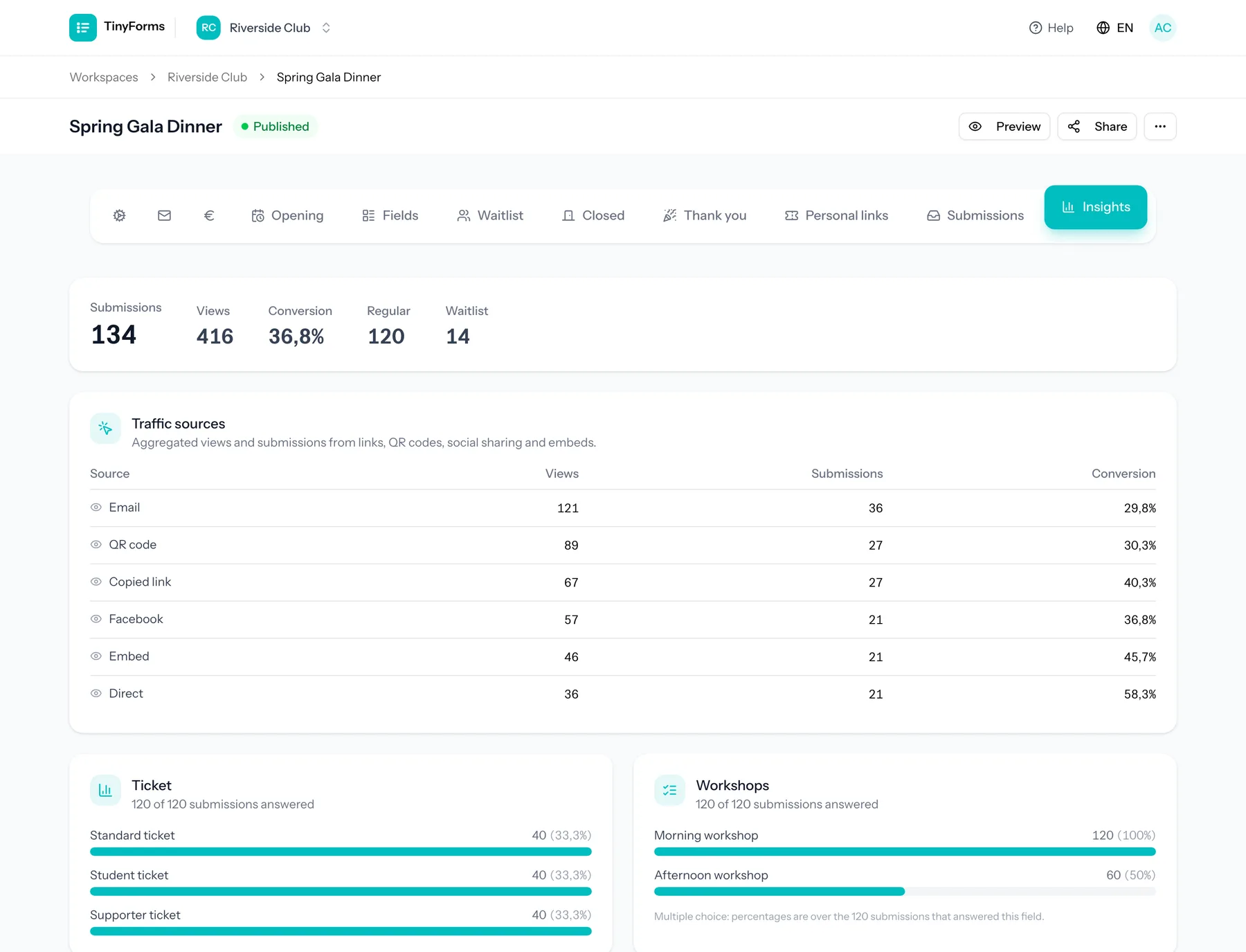
Money is not part of this view. Your Mollie dashboard is the record of what came in and what went back out, and it stays complete no matter what happens to the answers here.
What your retention period leaves behind
Visitor counts, traffic sources and drop-off are kept as daily totals, so those stay once your retention period removes the submissions. The breakdown per question is read from the answers themselves and shrinks along with them, so export before that window closes if you want to keep the detail.
Where people stop Link to this section
A form split into pages also shows how far people got: how many opened it, how many reached each following page, and how many stopped in between. The page that loses the most is called out, since that is usually the one worth rewriting or shortening.
Counts, not people
Only how often a page was reached is stored, per day. There is no cookie, no identifier and nothing that ties one page to the next, so this can say how many got that far but never who.